
- Home
- Free music tools
Free · in your browser · no account
Free music tools, right in your browser
Everything here runs inside your browser. Your files are never sent to a server, there is no account and there is no limit on how often you use them.
- Nothing is uploaded
- No account
- No watermark
- No limit
01 Three tools
Write it, convert it, print it
A notation editor and two converters for the files musicians actually trade: MusicXML scores and audio recordings.
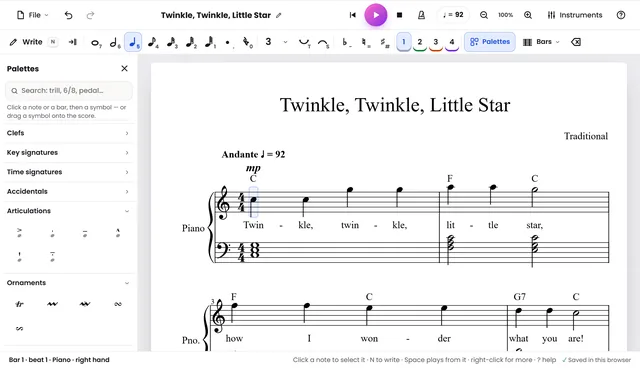
Vivace Creator — write sheet music
A free notation editor: type or tap the notes, hear them played back, add instruments, lyrics and chord symbols, then export MusicXML or MIDI, or print. Works on a phone too.
- Notes, chords, voices, tuplets and ties
- Playback with a mixer
- MusicXML, MIDI and print
 Audio
Audio Converter
Convert between MP3, WAV, M4A, FLAC and OGG. Trim, fade, normalise, change channels or sample rate.
- MP3 and WAV export
- Trim and fade
- Peak normalise
Sheet Music Converter
Open .mxl and .musicxml files without MuseScore, transpose them to any key, and export a printable PDF.
- Opens MusicXML and MXL
- Transpose by semitones
- PDF and PNG export
02 How it stays private
Your file never leaves
-
It opens in the tab
Drop or choose a file: the page reads it straight from your disk. There is no upload step and no queue.
-
Your device does the work
Decoding, editing, transposing and encoding all run in your browser, so they keep working if your connection drops.
-
The result is saved for you
The converted file goes to your downloads folder. Nothing is kept, logged or sent anywhere along the way.
Why are these free?
Because the browser can already do the work. Vivace Music is a free sheet-music and music-education site — there are no ads and no accounts anywhere on it, and these tools cost nothing to run because your own device does the processing.
Do my files get uploaded?
No. Each tool reads the file you choose directly in the tab and writes the result back to your downloads folder. Nothing is transmitted, so the tools keep working if your connection drops, and private or unpublished work stays on your machine. You can verify it in your browser's network panel.